Trust and process

Understanding audio transcription without AI

Audio transcription without AI usually means converting speech by hand or with rules that do not rely on machine-learning models. This guide explains what changed, where modern audio to text tools fit, and when a traditional workflow still makes sense.

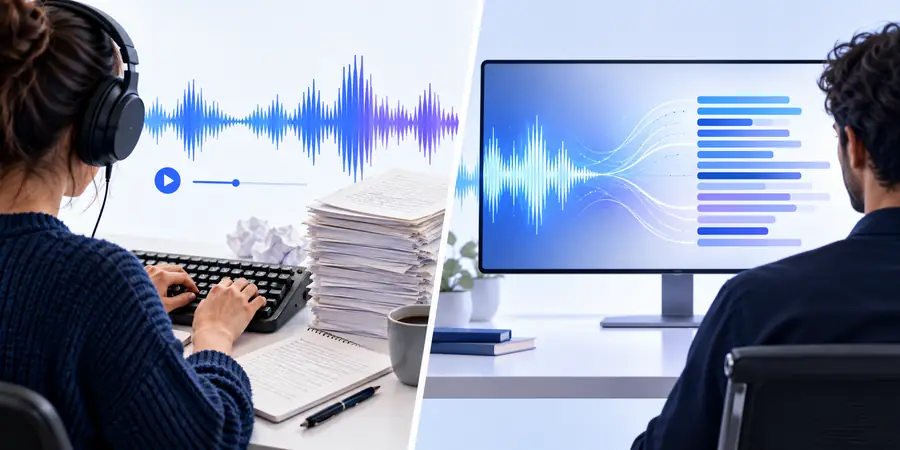
Comparison of traditional and modern audio transcription workflows

Where the older approach falls short

A non-AI workflow can be appropriate, but it has clear boundaries that should be understood before choosing it.

It cannot reliably understand varied speech

Fixed rules and manual methods do not automatically interpret every accent, speaking style, interruption, or pronunciation.

Workaround

Use a modern audio to text tool for a first draft, then review sensitive passages.

It cannot remove the need for quality control

Background noise, multiple speakers, low volume, and overlapping dialogue can produce missing or uncertain words.

Workaround

Improve the recording where possible and keep the original audio beside the transcript.

It cannot scale effortlessly

Long interviews, meetings, and lecture libraries become slow when every minute must be handled manually.

Workaround

Batch the work, create a review checklist, or use audio to text automation for the initial pass.

It cannot promise perfect meaning from rules alone

A word-for-word match may still miss context, speaker intent, punctuation, or the difference between similar terms.

Workaround

Have a person check names, numbers, quotations, and action items before publishing.

What a reliable workflow requires

Whether you choose manual transcription or audio to text software, a few basics improve the result.

You must have

Without every one of these the route does not run.

  • A recording you are authorized to process

    Confirm consent and handling requirements for private conversations.

  • Clear audio with voices separated from background noise

  • A way to identify speakers and mark uncertain words

  • A review pass for names, numbers, terminology, and punctuation

Nice to have

Skip any of these and the route still works — they only make it faster.

  • A preferred output format, such as plain text or a document

  • A style guide for timestamps, speaker labels, and verbatim detail

Related questions to explore

These nearby guides cover safety, platforms, and practical alternatives around audio to text work.

How it is done today

Current audio to text workflows combine automated recognition with human judgment instead of treating either one as sufficient by itself.

Start with the original recording

Keep the source file intact and note its context, speakers, language, and intended use before creating an audio to text draft.

Generate a working transcript

A modern tool can turn spoken audio into editable text quickly, giving you a useful starting point rather than a final record.

Review what matters

Check names, figures, technical terms, quotations, and sections affected by noise. Human review remains important even when recognition is strong.

Shape the final document

Add speaker labels, headings, timestamps, or summaries according to the audience. Transcription and editing are separate stages.

What changed

Automation changed the task, not the responsibility

Older transcription placed most of the effort in listening and typing. Modern audio to text tools move more effort toward preparation, review, and editing, which can make long recordings easier to manage without treating an automated draft as unquestionable.

For confidential or high-stakes material, the right choice is still the one that matches your privacy rules and accuracy needs. A careful manual workflow may be preferable in some cases, while audio to text automation is practical for searchable notes, interviews, lectures, and internal drafts.

The major change was not that human judgment disappeared; it moved from typing every word to checking, correcting, and shaping a generated draft.
  • LESS REPETITIVE TYPING
  • REVIEW SENSITIVE CONTENT
  • KEEP THE SOURCE AUDIO

Who switched

Choose the workflow by looking at the recording, the risk of an error, and what you need to do with the text afterward.

Choose this when

Choose manual transcription

Listen and type the recording yourself or assign it to a trained transcriber.

This is useful when the material is highly sensitive, the volume is small, or exact editorial control matters more than speed.

Choose this when

Choose audio to text automation

Create a transcript draft and correct it against the original recording.

This suits longer recordings, searchable notes, interviews, and first drafts where review time is available.

Choose this when

Choose a hybrid workflow

Use audio to text for the initial document, then apply a focused human quality check.

It balances efficiency with control when names, terminology, or compliance details must be dependable.

A modern transcription workflow

The process is straightforward when each stage has a clear purpose.

  1. 1

    Prepare the recording

    Confirm permission, identify the speakers, and use the clearest available audio before starting an audio to text conversion.

  2. 2

    Create the draft

    Run the recording through your chosen method, whether that is manual typing, rules, or an audio to text tool that produces editable text.

  3. 3

    Check the transcript

    Compare uncertain passages with the source, correcting names, numbers, speaker changes, and punctuation.

  4. 4

    Format for use

    Turn the checked text into notes, captions, a quote sheet, a searchable archive, or a polished document.

Choose the workflow that fits the recording

Audio transcription without AI is still a valid choice when privacy, control, or a short recording matters most. For larger workloads, a reviewed audio to text draft can reduce repetitive work while keeping the final decision with a person.

Start an audio workflow
  • Keep the original recording
  • Review names and numbers
  • Use automation as a draft

Its own FAQ

Common questions about traditional transcription, automation, and the boundary between them.

It generally means creating a transcript through manual listening and typing, human transcription services, or fixed rules that do not use machine-learning speech recognition. The exact method can vary, so ask how a tool processes recordings before relying on its label.

Yes, especially when a skilled person works from a clear recording and checks the result carefully. Accuracy depends on audio quality, speaker clarity, terminology, and the time available for review.

Neither is always better. Manual transcription offers direct control and can suit sensitive or short recordings, while audio to text software can create a faster first draft that still needs human checking.

Privacy, policy requirements, editorial control, and distrust of automated processing are common reasons. A manual workflow may also be practical when the recording is short or contains unusual terminology.

Check names, numbers, technical terms, speaker changes, quotations, and any passage affected by noise or overlapping speech. Always compare important claims with the original recording before sharing the text.

Start converting
Start converting